|
| |
skip to main |
skip to sidebar
Have a super-techie on your gift list that you still have NO IDEA what to give? No worries, our tech team* has scoured the internet and their very own wish list for gifts that will be sure to please even your most die-hard technophile.

[1] Makerbot replicator 2
Join the maker movement and print out your own things. Flex your creative muscles and make your own designs come to life. Or, take the easy way out and print other peoples' ideas from Thingverse.
[ 2] Arduino Uno Ethernet
Super popular Arduino Uno microcontroller board with networking built-in. Compact size, plethora of I/Os, and easy to use development environment make it a great choice for any physical computing project.
[3] Parrot AR.Drone 2.0
Remote controlled quadricopter with a 720p video camera. Control it with your smartphone and stream live video directly to your device. Sounds like fun to me.
[4] Raspberry Pi
Full Linux computer for $35. When the power of Arduino just isn't enough, or if you want an ultra-low-power media player.
Most importantly, supporting The Raspberry Pi Foundation's cause: help kids all over the world learn about programming and generally get them interested in computing.
[5] Beats by Dre, Beats Executive
Noise cancelling headphones that travel well and look good.
But wait...there's more! Perhaps your friend already has everything listed above (seriously though, if that's the case they don't need any more things) or the concept of pre-ordered goods really trips their gaming trigger. These are the things I love that you can't quite get your hands on yet. They are either on Kickstarter (or similar) currently, or have recently completed their fundraising campaign and are headed for market soon.

[bonus 1] Ouya
$99 Android based gaming console where all games are free-to-play
[bonus 2 ] Leap Motion
Control your computer in three dimensions with this motion controlling device. It can distinguish you individual fingers and track them with very high precision, making it far more sensitive and more flexible than a touchscreen.
[bonus 3] sticknfind
Bluetooth sticker that you can track with your smartphone. Stick them on things you often lose. Track up to 20 items at a time. Track things with the radar screen, or let the virtual leash notify you when something has gotten out of range. 'Find-it' can tell you when something that was out of range has come back in range.
* Our guestblogger today isn't afraid to try out the latest and greatest tech products or newest hacks out there. Please welcome Chad H.!
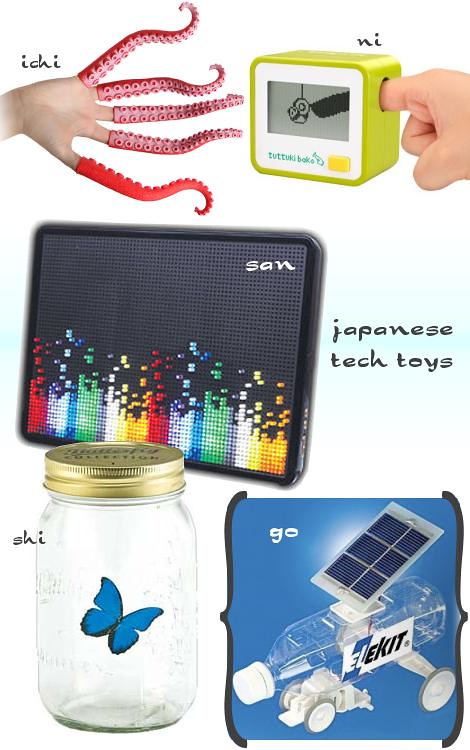
I sometimes lose myself looking at Japanese toys and gadgets on the interwebs. There are some truly absurd and amazing trinkets out there, making for a wellspring of gifts, from quirky to astonishing. Here are some favorites.

[ichi] finger tentacles . thinkgeek
Go ahead, freak people out with these things.
[ni] Poking Box . gizmine
You can fight a little karate stick figure guy with your digital digit, c'mon!
[san] Lumindot . Japan Gadget Shop
Like the old school Lite-Bright but waaaay better. Seriously, watch the video.
[shi] Electric Butterfly . Japan Gadget Shop
[go] Solar pet bottle car . japan trend shop
Got to get a cool shaped bottle, I suggest Ito En.
This gift guide brought to you by our friend, plasticblog. He can probably count to ten in Japanese.
Some people take pretty pictures and some people make pretty pictures out of data from those pictures. I, myself, don't do either, but enjoy looking at pretty pictures and data of pretty pictures. "Say what?!?", you say? Since a picture is worth a thousand words I will stop rambling and show you a few examples. Take a few minutes to marinate on these.
See or Say . Flickr uploads vs. Tweets by geography. Blue = Twitter, Orange = Flickr, White = Both (U.S. shown).
 Locals vs. Tourists
 . A look at who is posting pics to Flickr in major cities. Blue = locals, Red = tourists, Yellow = undetermined (Chicago shown).
 Flickr flow
 . Relative proportions of color seen in Flickr photos chronologically ordered. (Winter at the bottom).

It is with a little bit of shame that I admit my sanity and intelligence were tested last night by online photocard printing software. It all started out as another one of my innocent projects: get a picture taken, uploaded and printed for holiday postcards to send to family and friends. It sounded easy and plenty of people much busier than me have managed it for years - so I should be able to hammer it out in no time. Before you say anything, I realize that I am getting a late start on the whole idea - ideally these cards should have been shipped off and sitting in a mail pile or taped up in some crazy holiday card montage by now - but better late that never (that is today's motto). First, for the picture. A picture of Daniel and I would be boring and weird. A picture of our cats, on the other hand, would be weird in a cute way ( right?). After one round of trying 'posed' cat pictures and one round of laying on the ground next to our Christmas tree for 30 minutes trying to capture a magical moment, I gave up. I had an impromptu picture of Penfold (our older cat) sitting in a box from Christmas last year and decided slapping 'Happy Holidays!' on the card would suffice. Up to this point, although the photo sessions were a total bust, the project is still coming along nicely...well, maybe the cats hate it up to this point.  Rejected #1: Chihiro wrestles ribbon. Cute, but not what I was looking for. Rejected #1: Chihiro wrestles ribbon. Cute, but not what I was looking for. Rejected #2: Chihiro bats the ornament while Penfold looks on. Maybe if Penfold was giving his typical look of pure boredom at the camera and the angle was better (i.e. cords and the bottom of the radiator weren't key components of the shot).Now to create and order the card Rejected #2: Chihiro bats the ornament while Penfold looks on. Maybe if Penfold was giving his typical look of pure boredom at the camera and the angle was better (i.e. cords and the bottom of the radiator weren't key components of the shot).Now to create and order the card. I honestly thought this would be the easy part, but it turns out this is where whatever ideal specifications I had did not exist in the online printing world and I slowly start conceding them all. I simply wanted a postcard that had the one picture filling the front and a basic font that read 'Happy Holidays.' It turns out cartoony little reindeer, strung lights or dancing presents are much easier to put on a card than the words 'Happy Holidays.' A rundown of online vendors in case someone else is still getting their holiday card together ( you will notice I go from 'I' to 'we' at this point because I had a temper tantrum early in the online process and Daniel stepped in to mediate...and probably save the computer from being drop kicked): - mpix.com: The card and postcards can be customized to your liking by downloading software to your computer and then uploading the finished product. A few issues with this: 1) the download was huge (286 Mb), which took 20 minutes to download and 2) 3 minutes after that we realized it was a complete waste of time and accomplished what other sites could handle in an online version. This was the first time mpix let me down.
- kodakgallery.com: No postcards were available (that we could find). The pre-made border designs were okay, but too traditional for our taste. Also, in most options the picture was a small insert in a big border design, so it kind of got lost in the whole design. A picture of a family with these designs is probably okay, but a picture of a cat in a box, I think this approach would have evoked more of a 'WTH?' reaction.
- vistaprint.com: My sister used it for her save-the-date cards, so I figured we could find something that would work for the holidays. This site, however, definitely caters to the business world and although we had fun with our picture next to sayings like 'One day only!' and 'Everything on sale', it just didn't seem right. At this point, I was still holding out for our picture with online font overlay, because I thought it would print better.
- snapfish.com: This site started as a total bust. We selected postcards and found a red border that went along the bottom of the postcard and had big lettering. The sample lettering said 'Las Vegas' and we were just going to change that to 'Happy Holidays'. As it turns out, the wording couldn't be changed. Seriously, do that many people go to Vegas, come home and upload their prints to snapfish and then send postcards to friends?!? Defeated, we switched over to photocards that came in envelopes and found a simple design that had a small, red band over the main picture that read 'Merry Christmas'. Close enough.
A few of the card designs that didn't make the cut...  So the online part wasn't as smooth and catering to my particular(ly odd) needs as I thought it would be, but I will continue to patronize these vendors for my other photo printing needs. Most importantly, I still look forward to sending well-wishes to family/friends and just need to remember to take a deep breath and tap into the holiday spirit a bit more. [Update . 12/13/09 : Okay, time out on the holiday spirit bit for just one moment (read: I am going to complain for this entire paragraph, so read no further if you aren't in the mood.) We got the 'photocards' in the mail the other day...and they are nothing more than 5x7 photos, complete with Kodak paper water markings and a date/time/facility stamp running across the back. The only thing that made them even remotely like a card was the flimsy little envelope, which is see-through (but not in a cool glassine envelope kind of way) and has a snapfish logo printed on it. So one paper cutter, several large mailing labels and 2 hours later I have photocards on which I can actually pen a little note. Just an update that I do not recommend snapfish for your holiday or photocard needs. Humpfh!]
Who hasn't typed a keyword question into a search engine they wouldn't dare ask their best friend or doctor? I mean, why not? Somewhere out in the vast online world is the answer - or some bogus information that pacifies you for the time being - and it is anonymous...right? Don't be fooled! These search engines are backstabbing little friends. They can turn on you at a moment's notice and announce all your little indiscretions to anyone who cares. A recent entry on gawker.com explores the autofill feature on Google that suggests what you might be searching for based on previous searches. Although this broadcasts previous keyword searches, the benefit of anonymity is still present.* But this article made me think back to the AOL search leak from 2006: 3 months of AOL searches were accidentally published showing not only search keywords, but user ID and dates. Piecing this information together showed an intriguing and very telling insight into the lives of these users. Even today the keyword searches are fascinating to peruse (and, yes, the files are well preserved online in both raw and well-documented forms) and have even inspired a play (of course). In my humble opinion, one of the funniest write-ups documenting the leaked information was on somethingawful.com.** Enjoy other's follies/queries and pledge to start searching your most intimate questions on some random computer! *well...those smartie pants at Google have enough information about me that they could easily create some kind of android that would fool even my closest loved ones. To answer the question, though, they do log all searches and identifying information such as 'Internet Protocol address, browser type, browser language, the date and time of your request and one or more cookies that may uniquely identify your browser.' (courtesy of Google privacy FAQ)**Not suitable for work due to content. Also, I guarantee you will be laughing out loud.
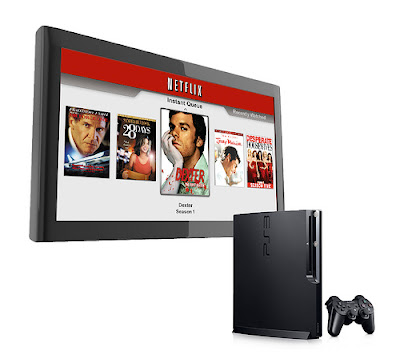 Back in January I wrote an entry extolling the virtues of the Playstation 3. According to my list, the second best reason to own a PS3 is watching movies: "The PS3 is a very capable Blu-Ray and DVD player. It even upscales DVD’s to near-HD resolution. You can also purchase or rent movie downloads from the PlayStation Store, although I find the current selection and prices underwhelming. I am envious of the Xbox360’s ability to stream Netflix movies. If Sony can get their act together and make this happen, it would truly make the PS3 the end-all-be-all home entertainment device." I am very pleased to report that as of last week, Sony has “[gotten] their act together.” As long-time Netflix subscribers, getting up and running was pretty simple. Here's how: - Go to this page. If you are already logged in to your Netflix account, you will see a button to request your free Netflix streaming disc for PS3. Click this button. You should receive a confirmation email shortly thereafter.
- A few days later, your PS3 streaming disc should arrive in the mail. It comes in a familiar red envelope. Open that envelope, fire up the PS3 and insert the disc. Select the “Netflix” option under the Video menu once it appears.
- The Netflix streaming interface will eventually display. You will be prompted on screen with a 5 character alphanumeric activation code and a netflix.com URL to visit. Go to the URL provided and enter your activation code. A few seconds later, the Netflix interface on your PS3 will spring to life.
- The first screen you will see is your “Instant Queue.” If you have ever streamed movies through Netflix on your computer, you know what I’m talking about. If you haven’t, any movie that you have added to your normal mailing queue that is also available for streaming will automatically show up in your Instant Queue. You can also add movies directly to your Instant Queue. Navigating the on-screen menus is fairly straightforward. When you’re ready to watch a movie, just highlight it and press Enter (on your Blu Ray remote) or Down (on your PS3 controller).
- When you select a movie to watch, it will take about 10 seconds up to a minute to buffer before playback starts. After that, it’s more or less like watching a DVD.
So far, these are my impressions of this service: Pros- Free with a Netflix subscription
- Easy to set up; easy to use
- Playback is smooth (no lag; once started, the video never stops to buffer)
- Episodic content (TV shows) is handled well
- There’s always something to watch!
Cons- Selection could be better (not everything is available for streaming)
- Quality is about on par with standard definition TV
- Navigating is a bit cumbersome when you have a lot of movies in your queue
- Requires the disc to be in the PS3 during playback
I live with a music and tech geek (and a totally crappy blog contributor). This means I get exposed to new music and gadgets without the work, but am also exposed to...how do I put this delicately?...somewhat unproven music and gadgets at times. Music is much easier to preview, so the unproven part falls largely in the category of technology. Take wireless, in-home stereo systems, for example, we've gone through the Audiotron ( booo), PS3 ( yay) and, as of last week, the Streamium (super yay). [Quick Addendum . 08/20/09: What is a wireless, in-home stereo system? It is a piece of hardware that can play music over a wireless network, perhaps from a subscription service (Rhapsody, et al.) or off a main home computer over a wireless router. The resident tech geek set up our home computer to house all our music, but without a wireless system the music could only be played through the computer. Throw the wireless stereo into the mix and now the music is played in any room the stereo resides (within the wireless network, of course).]  The Audiotron took a degree in computer science to hook up and still had numerous flaws. The Playstation 3 has a music feature built-in and was a surprisingly great solution for streaming music, but not portable (you need to hook it up to a TV at the very least or TV and speakers). The Streamium looked to provide a musical solution for our kitchen, office, bedroom and all other locations our heart's desired. Having run it through the gauntlet in the kitchen, here is my official verdict: | Pros | Cons | | - Portable | - Big cord and adapter | | - Insanely fast setup - so easy! | - Buffering between songs causes a small pause | | - Compact design |
| | - Search capabilities |
| | - Good sound |
| | - Wireless |
|
Overall the Streamium has been a great purchase - I give it 4.5 out of 5 stars. Overall I give my music and tech geek 4.8 out of 5 (slight deduction for not blogging about this himself). [Addendum . 09/03/09: The Streamium gets lugged around the house more frequently than a purse dog in Southern California. It has been a great investment.]
I get it: evolve or die. But e-mail...really? Okay, so it isn't an official law or anything - but a recent article at pcmag.com has pronounced e-mail's pulse has officially flat-lined (not even a far-flung future day scenario)! The author, one Mr. John C. Dvorak, presents 9 issues that have made e-mail useless for him and countless others. I think we all give a hearty "hear!, hear!" to the argument of spam being a large part of e-mail's downfall*. Check out the article for the whole list of arguments. *Of note: The frustrations of spam and its part in the slow demise of e-mail is nothing new. A quick search on "the future of e-mail" provides lots of info on articles, editorials and conferences worried about spam's affect on the safety (i.e. phishing) and productivity of the e-mail user that date over 5 years.
Today marks a new chapter in lickity list entries. Daniel has signed on as a contributor and will no longer be marked as a guest blogger. Hopefully he is prolific in his entries.It's hard to sell your significant other on the idea of a $400 video game console. I'm here to help.  5. Surfing the Web 5. Surfing the WebIt’s an easy way to enjoy videos of people doing stupid stuff when you have company over. Some sites (including youtube) are starting to offer a TV version to make it easier to navigate from your couch. 4. Presenting SlideshowsHook a digital camera up to one of the PS3’s USB ports and bore your guests with pictures of your cat doing stupid cat stuff. Or, if you’re really cool ( ed. note: nerdy), stream pictures directly from your flickr account. 3. Playing GamesDuh! You can’t go wrong with Rock Band, SingStar or Buzz! at any social gathering. Fallout 3 and LittleBigPlanet are must-haves for solo play. You can even download full games through the PlayStation Store. Early model PS3’s could play PS2 games, but Sony scrapped that feature to cut manufacturing costs (I guess?). 2. Watching MoviesThe PS3 is a very capable Blu-Ray and DVD player. It even upscales DVD’s to near-HD resolution. You can also purchase or rent movie downloads from the PlayStation Store, although I find the current selection and prices underwhelming. I am envious of the Xbox360’s ability to stream Netflix movies. If Sony can get their act together and make this happen, it would truly make the PS3 the end-all-be-all home entertainment device. 1. Listening to MusicYour entire music collection at your fingertips! Here’s what you do: Rip all of your CD’s to your computer. If you’ve already gone digital with your collection, good for you – the road ahead has gone from “easy” to “really easy.” Install TVersity (it’s free) on said computer. As long as the PS3 and the computer are on the same home network, the PS3 will magically “see” your computer, and you can now play any song stored on the computer through the PS3. I cannot understate how much I enjoy this.
| | | |




 Posts
Posts


